
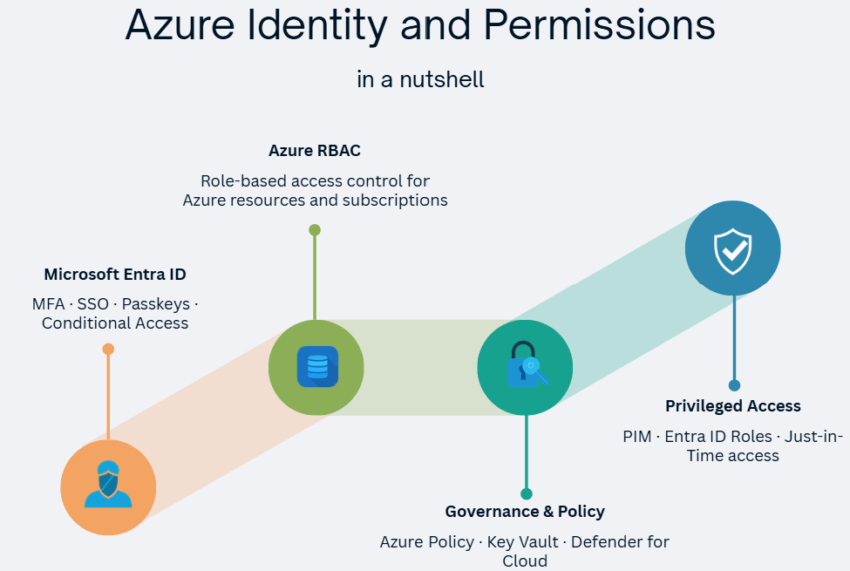
Entra ID, RBAC, Conditional Access, PIM, Managed Identities, Azure Policy, and Defender for Cloud.
🛡️ Why Identity Is the New Perimeter
Identity is the primary control surface for securing Azure. The traditional network perimeter no longer works. Users, devices, and applications connect from everywhere.
Microsoft’s Zero Trust model replaces implicit trust with explicit verification. Every access request is evaluated against identity, device state, location, and risk, regardless of where it originates. Six pillars underpin Zero Trust: Identities, Devices, Applications, Data, Infrastructure, and Network.
| Principle | What it means |
|---|---|
| Verify explicitly | Always authenticate and authorise using all available signals |
| Use least privilege | Grant only the minimum access needed, just in time |
| Assume breach | Minimise blast radius, segment access, encrypt end-to-end |
Microsoft Conditional Access sits at the centre, enforcing Zero Trust policies on every access attempt.
🧩 Microsoft Entra ID
Microsoft Entra ID is the cloud identity and access management service that underpins all of Azure. Formerly called Azure Active Directory (Azure AD), it handles authentication, authorisation, and SSO (Single Sign-On) for Microsoft 365, Azure, and thousands of third-party SaaS applications.
Entra ID is not a cloud version of on-premises Active Directory. Traditional AD uses Kerberos, NTLM, and LDAP over a domain structure. Entra ID uses OAuth 2.0, SAML, and OpenID Connect over a tenant-based model. The two can co-exist in a hybrid configuration through Microsoft Entra Cloud Sync, the successor to Entra Connect Sync, transitioning from April 2026.
Entra ID Plans
| Plan | Key features | Price (USD list) | Included in |
|---|---|---|---|
| Free | MFA, SSO, basic reporting, user management | Included | Azure, M365, Dynamics 365 subscriptions |
| P1 | Conditional Access, hybrid identity, dynamic groups, SSPR | $6/user/month | M365 E3, Business Premium |
| P2 | Everything in P1 + Identity Protection, PIM, Access Reviews | $9/user/month | M365 E5 |
| Entra Suite | ID Governance, Internet Access (SWG), Private Access (ZTNA), ID Protection, Verified ID Premium | $12/user/month | Standalone / M365 E7 |
💡 P1 is the minimum for Conditional Access. Most organisations with Microsoft 365 Business Premium or E3 already have it.
Entra ID vs On-Premises Active Directory
| Active Directory (AD DS) | Microsoft Entra ID | |
|---|---|---|
| Environment | On-premises | Cloud |
| Protocols | Kerberos, NTLM, LDAP | OAuth, SAML, OpenID Connect |
| Management unit | Domain, OU, GPO | Tenant, group, role |
| Use case | Corporate PCs, file servers | Cloud apps, SaaS, mobile |
When legacy protocols are needed in Azure, for example Kerberos for lift-and-shift workloads, Microsoft Entra Domain Services provides a managed domain controller with no VMs to patch.
🆕 Entra Cloud Sync replacing Entra Connect Sync (from April 2026). Microsoft is transitioning tenants from the on-premises Connect Sync agent to cloud-native Entra Cloud Sync. Notifications start July 2026 via M365 Message Center. Assess readiness now.
🔑 Authentication: MFA, SSO & Passkeys
Authentication is how Entra ID verifies identity. MFA (Multi-Factor Authentication) requires something you know plus something you have or are. Entra ID supports several methods, from hardware tokens to mobile apps.
MFA Methods Available in Entra ID (2026)
| Method | Notes |
|---|---|
| Microsoft Authenticator (push/code) | Most widely used; supports number matching |
| SMS / voice call | Weakest; avoid for privileged accounts |
| FIDO2 security key (e.g. YubiKey) | Hardware token; strongest for shared devices |
| Passkey | GA since 2025; stored in Authenticator or Windows Hello |
| QR code | For frontline workers on shared mobile devices (iOS/Android); uses QR code + PIN |
| External MFA (GA 2026) | Third-party MFA via standards-based integration; replaces Custom Controls |
🔴 Custom Controls retire 30 September 2026, end of life May 2027. Migrate to External MFA now. Custom Controls allowed third-party MFA in Conditional Access but lacked consistent policy enforcement. External MFA closes that gap.
SSO (Single Sign-On) lets a user authenticate once and access all connected applications. Entra ID issues a security token that other apps accept without re-prompting. Supported methods include OpenID Connect + OAuth (modern apps), SAML (enterprise federation), and Password-based (legacy apps).
🔒 Conditional Access
Conditional Access is the decision engine that sits between a user and the resource they want. It analyses signals: who is logging in, from where, on which device, and at what risk level. It then decides what to do.
The logic is: IF (signals) → THEN (decision) → ENFORCE (controls).
Signals
- User & group
- Location / IP
- Device compliance
- App being accessed
- Sign-in risk score
Decision
- Allow
- Allow with condition
- Block
Enforcement
- Require MFA
- Require compliant device
- Require approved app
- Deny access
💡 Conditional Access requires Entra ID P1 or P2. Also included in Microsoft 365 Business Premium, E3, and E5.
🆕 Conditional Access enforced during credential registration (July 2026). Policies targeting “Register security information” now also apply to Windows Hello for Business provisioning and macOS Platform SSO. Rollout starts July 6, complete July 13, 2026. Test policies in report-only mode before July 6.
🆕 Conditional Access on PIM role activation now GA (May 2026). Administrators can require MFA or other Conditional Access controls before a user activates a privileged role via PIM, enforcing Zero Trust for all elevated access.
🎭 Azure RBAC
Azure RBAC (Role-Based Access Control) is the authorisation system for Azure resources. It answers three questions: who can do what on which resources. Every access grant is a role assignment. It combines three elements:
The Five Fundamental Roles
| Role | Read | Create/Edit/Delete | Grant access | Notes |
|---|---|---|---|---|
| Owner | ✅ | ✅ | ✅ | Full control including access management |
| Contributor | ✅ | ✅ | ❌ | Full control; cannot manage access |
| Reader | ✅ | ❌ | ❌ | View only |
| User Access Administrator | ✅ | ❌ | ✅ | Manage access only; no resource actions |
| RBAC Administrator | – | – | ✅ (RBAC only) | Manage role assignments; no resource access |
Beyond these five, Azure has over 100 built-in job function roles (e.g. Virtual Machine Contributor, Storage Blob Data Reader). You can also create Custom Roles with specific permission sets for your organisation.
Scope and Inheritance
Permissions inherit downward through the hierarchy. A role assigned at subscription level automatically applies to all resource groups and resources within it. Always assign at the narrowest scope needed.
Management Group
  └─ Subscription
       └─ Resource Group
            └─ Resource            ← assign here for narrowest scope
🔴 Classic administrator roles are fully retired as of May 2026. Co-Administrator and Service Administrator no longer exist. The Classic Administrators tab has been removed from the Azure portal. Use Azure RBAC role assignments only.
🔀 Azure RBAC Roles vs Entra ID Roles
Azure has two separate role systems. They look similar but control entirely different things. Mixing them up is one of the most common permission mistakes in Azure.
| Azure RBAC Roles | Entra ID Roles | |
|---|---|---|
| Controls access to | Azure resources (VMs, storage, databases, subscriptions) | Entra ID itself (users, groups, apps, directory settings) |
| Assigned at | Management Group, Subscription, Resource Group, or Resource | Tenant level (no scope hierarchy) |
| Example roles | Owner, Contributor, Reader, VM Contributor | Global Administrator, User Administrator, Billing Admin |
| Managed in | Azure portal → Access Control (IAM) | Entra ID portal → Roles and administrators |
| Number of built-in roles | 100+ | 100+ |
| Who needs them | Anyone managing Azure infrastructure | Anyone managing identity, users, or Entra settings |
The two systems do not overlap. A user with Contributor on a subscription can create and manage Azure resources but cannot read or change any Entra ID directory objects. A user with User Administrator in Entra ID can create and manage users but cannot touch any Azure resources unless also assigned an Azure RBAC role.
The single most important rule: Global Administrator in Entra ID does not give access to Azure resources. It only controls directory-level operations.
⚠️ Global Administrator can elevate to User Access Administrator. A Global Admin can grant themselves the User Access Administrator role at the root management group, giving access to all Azure resources in the tenant. This is a break-glass action and should be reverted immediately after use.
⏱️ Privileged Identity Management (PIM)
PIM (Privileged Identity Management) adds just-in-time (JIT) access to Azure RBAC and Entra roles. Instead of permanently holding a privileged role, users are eligible. They activate it for a limited time window when needed. This shrinks the attack surface: a compromised account with no permanent privileges can do far less damage.
Request
User requests a privileged role for a set time
Approve
Manager or peer approves (or auto-approve)
MFA
Reauthentication required at activation
Active
Role active for the approved window only
Expire
Role removed automatically; audit log retained
💡 PIM requires Entra ID P2 or Entra ID Governance licensing.
🆕 Access Packages now govern Azure RBAC at all scopes (June 2026). Entra ID Governance Access Packages can assign Azure RBAC roles at management group, subscription, and resource group level, with the same request, approval, and time-bound lifecycle used for application access.
🤖 Managed Identities & Service Principals
Applications and services need credentials to call Azure APIs. Storing those credentials in code or configuration files is a security risk. Azure offers two identity types that eliminate static secrets.
Managed Identities
A Managed Identity is an Entra ID identity created and managed automatically by Azure for a resource, for example a VM, Function App, or AKS pod. There are no passwords, certificates, or secrets to rotate. The identity accesses other services through RBAC role assignments, using the same mechanism as a human user.
System-assigned
- Lifecycle: Tied to the resource; deleted with it
- Shared: No: one identity per resource
- Best for: Single-resource, simple apps
User-assigned
- Lifecycle: Standalone; survives parent deletion
- Shared: Yes: assign to multiple resources
- Best for: Shared identity across multiple apps
Service Principals
A Service Principal is an Entra ID application identity used by automation, CI/CD pipelines, and third-party tools that run outside Azure. Unlike Managed Identities, Service Principals require credential management (client secrets or certificates). Use Managed Identities wherever possible; use Service Principals only when the workload runs outside Azure.
🆕 Entra Agent ID (GA, April 2026). Agent ID gives AI agents their own dedicated Entra identity, separate from Managed Identities and service principals. Each agent gets a scoped permission set, independent from the user it acts for. This prevents agents from inheriting excessive user privileges, a key governance control for agentic AI deployments. Requires Agent 365 licensing.
🪪 App Registration vs Enterprise Application
These two blades in the Azure portal confuse almost everyone. They are two sides of the same coin, not two separate things.
When you register an application in Entra ID, two objects are created automatically:
| Object | What it is | Lives in |
|---|---|---|
| App Registration | The global application definition: client ID, redirect URIs, API permissions, certificates and secrets | Your tenant (the publisher’s tenant) |
| Enterprise Application | The local service principal instance of that app in a given tenant | Every tenant where the app is installed |
An App Registration is the blueprint. The Enterprise Application is the running instance. One creates the other automatically. The portal presents them as two separate blades, which makes them look unrelated.
App Registration
Global definition · Client ID · API permissions · Secrets & certs · Publisher’s tenant
Enterprise Application
Local instance · Who can access · SSO config · User provisioning · Each tenant separately
The practical split: go to App Registrations to define the app, configure permissions, and add client secrets. Go to Enterprise Applications to manage who can access the app, configure SSO, and set up provisioning.
When a user or admin consents to a third-party SaaS app (e.g. Slack, Zoom, Salesforce), Entra ID creates an Enterprise Application in your tenant automatically. You never see an App Registration for it. That lives in the vendor’s tenant.
💡 One app, two tenants, different objects. A multi-tenant app has one App Registration (in the publisher’s tenant) and one Enterprise Application in each tenant where it is installed. The App Registration controls the app definition. The Enterprise Application controls local access and SSO behaviour.
🔐 Azure Key Vault
Azure Key Vault is the central store for secrets, encryption keys, and TLS/SSL certificates. Applications retrieve credentials at runtime. Nothing is stored in code or configuration files.
Key Vault Tiers (2026)
Standard
Software keys · Multi-tenant · Dev/test & non-regulated workloads
Premium
HSM-backed keys (see FIPS note below) · Multi-tenant · Production & regulated environments
Managed HSM
Dedicated FIPS 140-3 Level 3 HSM · Single-tenant · Highest compliance requirements
💡 Key Vault Premium FIPS levels: New keys use FIPS 140-3 Level 3 (HSM Platform 2). Older key versions created before the platform upgrade may be on FIPS 140-2 Level 2 (HSM Platform 1). All new key versions default to Platform 2.
| Access model | How access is granted | Recommended? |
|---|---|---|
| Vault access policy | Legacy per-vault permission model | ❌ Legacy; not recommended for new deployments |
| Azure RBAC | Standard role assignments on the vault resource | ✅ Recommended |
💡 Always use a Managed Identity to authenticate from your application to Key Vault. No credentials stored anywhere.
📋 Azure Policy & Governance Hierarchy
Azure Policy enforces organisational standards across all resources at scale. A policy definition is a JSON rule, for example: “VMs must use managed disks” or “Storage accounts must require HTTPS”. Policy evaluates both new and existing resources continuously.
Policy Effects
| Effect | What happens |
|---|---|
| Audit | Logs non-compliance; does not block creation |
| Append | Adds fields to a resource at creation or update |
| Deny | Blocks creation or update of non-compliant resources |
| Modify | Automatically corrects a non-compliant resource property |
| DeployIfNotExists | Deploys a missing companion resource automatically |
An Initiative groups multiple policy definitions for a compliance standard, for example PCI-DSS, ISO 27001, or CIS Azure Benchmark. Assign an initiative once to cover all constituent policies.
The Governance Hierarchy
Policies, RBAC assignments, and Resource Locks all operate within the same management hierarchy. What you assign at a higher level is inherited by everything below it.
Root Management Group  ← one per Entra tenant; cannot be deleted
  └─ Management Groups  ← up to 6 levels (not counting root or subscriptions); max 10,000 per directory
       └─ Subscriptions
            └─ Resource Groups
                 └─ Resources
Resource Locks protect critical resources from accidental change or deletion. A CanNotDelete lock prevents deletion but allows reads and edits. A ReadOnly lock prevents all changes. Even a subscription Owner must remove the lock first.
🔴 Azure Blueprints (Preview) retires 11 July 2026. Migrate existing blueprint definitions and assignments to Template Specs and Deployment Stacks before that date. The Azure CLI az blueprint command group is deprecated and will be removed in CLI v2.87.0 (scheduled June 2026).
🔍 Microsoft Defender for Cloud
Microsoft Defender for Cloud is the unified security posture management and workload protection platform for Azure, on-premises, and multi-cloud environments. Its category is CNAPP (Cloud-Native Application Protection Platform).
| Mode | What it provides | Cost |
|---|---|---|
| Foundational CSPM | Secure Score, basic recommendations, asset inventory | Free |
| Defender Plans | Advanced threat detection per service type | Per resource/month |
The Four Core Capabilities
- Secure Score: a 0–100 rating of your subscription’s security posture. Each implemented recommendation increases the score.
- Security Alerts: threat detections with severity (High / Medium / Low) and step-by-step remediation guidance.
- Recommendations: proactive, actionable improvements with impact on Secure Score.
- Regulatory Compliance: continuous assessment against PCI DSS, ISO 27001, SOC 2, NIST, and others.
💡 Recommendations are not alerts. Recommendations are proactive suggestions to improve your posture. Alerts are real-time detections of active threats. Both appear in the same dashboard but serve different purposes.
Defender Plans by Workload
| Plan | What it protects | Status |
|---|---|---|
| Defender for Servers (P1/P2) | VMs and on-premises servers | ✓ Active |
| Defender for App Service | Azure App Service apps | ✓ Active |
| Defender for Storage | Storage Accounts | ✓ Active |
| Defender for SQL | Azure SQL, SQL on VMs, on-premises SQL | ✓ Active |
| Defender for Containers | AKS, Container Registry, Kubernetes | ✓ Active |
| Defender for Key Vault | Key Vault secrets and access anomalies | ✓ Active |
| Defender for Resource Manager | ARM operation anomalies | ✓ Active |
| Defender for APIs | API Management endpoints | ✓ GA (Nov 2023) |
| Defender CSPM | Advanced posture management with attack path analysis | ✓ Active |
🏗️ Post-Build 2026 Status Map
Microsoft Build 2026 (June 2–3, San Francisco) brought significant changes to identity and security. The table below captures the current status of every service covered in this article.
| Service / Feature | Status | What changed at Build 2026 / recently |
|---|---|---|
| Microsoft Entra ID | ✓ Active | Agent Identity Perimeter: Conditional Access for agents requires P1 + Agent 365; risk-based agent policies require P2 |
| Entra Cloud Sync | ✓ Active (replacing Connect Sync) | Transition notifications begin July 2026; phased migration from on-premises Connect Sync agent |
| Conditional Access | ✓ Active | CA enforced during credential registration: rollout starts July 6, complete July 13, 2026; CA on PIM activation GA |
| Passkeys (FIDO2) | ✓ GA (2025) | Policy size now dedicated 20 KB; passkey profiles per tenant increased from 3 to 10 |
| Phishing-resistant MFA on Linux | 🆕 New (June 2026) | Ubuntu 24.04/26.04 and RHEL 8/9/10 now supported via Microsoft identity broker |
| External MFA | ✓ GA (2026) | Replaces Custom Controls; full Conditional Access integration with third-party MFA providers |
| Custom Controls (CA) | ⚠ Retiring 30 Sep 2026 | End of life May 2027. Migrate to External MFA now |
| Entra PIM | ✓ Active | CA reauthentication on role activation GA; Access Packages now govern Azure RBAC at all scopes |
| Entra Agent ID | ✓ GA (April 2026) | Dedicated Entra identity for AI agents; prevents over-privileged agent access. Requires Agent 365 licensing. |
| Azure RBAC | ✓ Active | Classic administrator roles fully retired May 2026; over 100 built-in roles available |
| Classic admin roles | 🔴 Fully retired (May 2026) | Classic Administrators tab removed from Azure portal; use Azure RBAC only |
| Managed Identities | ✓ Active | No changes |
| Azure Key Vault | ✓ Active | RBAC access model recommended over vault access policies |
| Azure Policy | ✓ Active | No changes |
| Azure Blueprints | 🔴 Retiring 11 July 2026 | Migrate to Template Specs + Deployment Stacks; az blueprint CLI removed in v2.87.0 |
| Defender for Cloud | ✓ Active | Defender + GitHub Code Security integration GA; MDASH agentic scanning expanded preview |
| Defender for APIs | ✓ GA (Nov 2023) | No further changes |
| SSPR method enforcement | 🆕 Change (Sep 7, 2026) | SSPR accepts only explicitly registered methods; registration campaign starts July 6, 2026 |
📌 Quick Reference
| Scenario / When to use it | Right service / tool |
|---|---|
| Authenticate users to Azure and Microsoft 365 | Microsoft Entra ID |
| Allow staff to log in once and access all apps | Entra ID SSO |
| Add a second verification step at login | Entra ID MFA |
| Eliminate passwords entirely | Passkeys (FIDO2) via Entra ID |
| Block sign-ins from risky locations or devices | Conditional Access |
| Integrate a third-party MFA provider | External MFA (not Custom Controls) |
| Sync on-premises AD to the cloud | Entra Cloud Sync (preferred over Connect Sync for new deployments) |
| Run legacy Kerberos/NTLM in Azure without DCs | Microsoft Entra Domain Services |
| Understand the difference between App Registration and Enterprise App | App Registration = definition (publisher tenant); Enterprise Application = instance per tenant |
| Understand the difference between Azure RBAC and Entra ID roles | RBAC = Azure resources; Entra roles = identity and directory management |
| Grant a user access to a resource group | Azure RBAC role assignment |
| Grant the minimum access for a job function | Built-in role (e.g. Contributor, Reader) |
| Create a custom permission set | Custom Role in Azure RBAC |
| Temporarily elevate a privileged admin role | PIM just-in-time activation |
| Periodically review who still needs a role | PIM Access Reviews |
| Allow an Azure app to call other Azure services | Managed Identity (system- or user-assigned) |
| Allow a CI/CD pipeline to deploy to Azure | Service Principal |
| Allow an AI agent to act with limited scope | Entra Agent ID (GA, April 2026) |
| Store API keys, passwords, and certificates securely | Azure Key Vault |
| Prevent non-compliant resources from being created | Azure Policy (Deny effect) |
| Apply a standard set of policies across subscriptions | Azure Policy Initiative |
| Organise and govern multiple subscriptions centrally | Management Groups |
| Prevent accidental deletion of a critical resource | Resource Lock (CanNotDelete) |
| Prevent any changes to a critical resource | Resource Lock (ReadOnly) |
| Package RBAC + policies + ARM templates for a subscription | |
| Monitor security posture across all Azure resources | Defender for Cloud (Secure Score) |
| Get actionable security recommendations | Defender for Cloud Recommendations |
| Detect active threats against Azure workloads | Defender Plans (per service type) |
| Ensure compliance with PCI-DSS or ISO 27001 | Defender for Cloud Regulatory Compliance |
