
Azure Notes #2
Immutable doesn’t mean frozen
You need to protect files for years, store them cheaply, and still retrieve them. Does locking their retention also lock their storage tier?
The problem
A Microsoft Q&A question from 9 September 2025 describes exactly this concern: keep files for 30 years under a locked immutable policy, move them to Archive with lifecycle management, and download them when needed.
The question was simple: will immutability block the move back out of Archive?
No. Azure allows tier changes for immutable blobs. The less obvious trap is what your lifecycle policy might do after you bring the file back online.
How it works
Three settings do three different jobs:
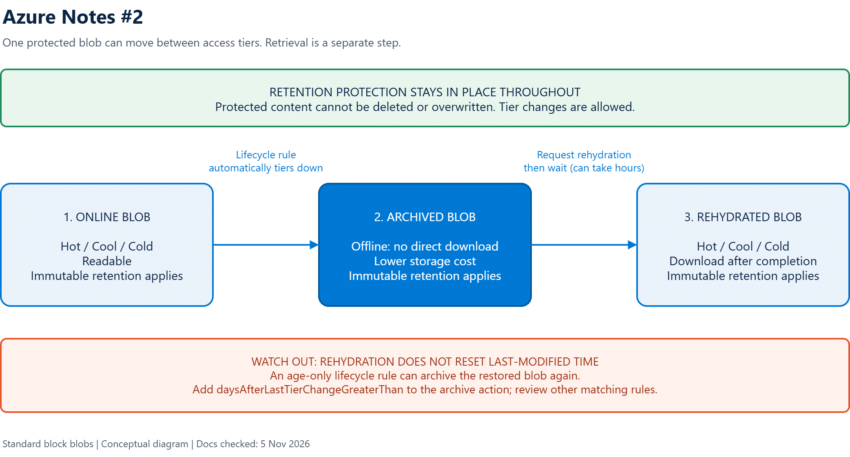
- Immutable retention protects the blob against deletion and overwriting for the required period. This is WORM: Write Once, Read Many.
- Lifecycle management moves eligible blobs to a cooler tier automatically. Tier changes are allowed; deletion of a protected blob is not.
- Rehydration brings an archived blob back to Hot, Cool, or Cold so you can read it. You request this separately; lifecycle management cannot rehydrate it for you.
Changing the tier does not remove or restart the immutable retention period. Archive is offline storage, however: a download must wait until rehydration finishes.
The trap: your restored file can be archived again
Suppose your lifecycle rule archives blobs more than 30 days after their last modification. You rehydrate an older blob by changing its tier.
Rehydration does not update its last-modified time. The blob still meets the age condition. A later lifecycle run can therefore send it straight back to Archive.
Also budget for retrieval. Rehydration can take hours, higher-priority retrieval costs more, and moving a blob out of Archive before its 180-day minimum can incur an early deletion charge. Lowest storage price does not mean fastest or cheapest recovery.
The approach: protect, tier, retrieve, verify
-
1. Separate retention from tiering
Choose the required protection period and a supported storage configuration. This example concerns standard block blobs with container-level time-based retention. Archive supports LRS, GRS, and RA-GRS, not zone-redundant configurations.
-
2. Give rehydrated data a window online
Add
daysAfterLastTierChangeGreaterThanto the archive action. This illustrative rule uses a 30-day age threshold and a seven-day window after rehydration:{ "rules": [{ "name": "archive-with-retrieval-window", "enabled": true, "type": "Lifecycle", "definition": { "filters": { "blobTypes": ["blockBlob"], "prefixMatch": ["records/"] }, "actions": { "baseBlob": { "tierToArchive": { "daysAfterModificationGreaterThan": 30, "daysAfterLastTierChangeGreaterThan": 7 } } } } }] }records/is an example container prefix. The numbers are examples, not defaults or retention requirements. Merge the rule into your existing policy rather than replacing it, and check that no other rule can rearchive the same data sooner. Lifecycle processing is asynchronous, not an exact-day scheduler. -
3. Request retrieval, then wait for completion
Request an online tier for the archived blob and check that rehydration completes before downloading. If you rehydrate by copying instead, the original stays archived, but the new copy needs its own protection and cleanup plan; do not assume it has inherited the source’s policy.
-
4. Test before locking a long retention period
Use disposable data and an unlocked policy in an isolated test container. Check protection, tier changes, retrieval time, and lifecycle behavior. A locked retention policy cannot be removed or shortened, so do not lock a 30-year policy just to try this out.
Immutable protects the content, not a fixed access tier.
Keep the protection. Plan retrieval. Stop lifecycle management from undoing your restore.
Documentation and further reading
- The source story: retention, Archive, and rehydration (9 September 2025)
- Immutable storage: access tiers and locked policies
- Lifecycle policy structure and tier-change conditions
- Rehydration and avoiding lifecycle rearchiving
- Access tiers, redundancy, and early deletion charges
- Azure Blob Storage pricing
