
Where to Start and What You Must Understand
I keep seeing the questions about Azure networking:
- Where do I start?
- What should I learn first?
- Why does it feel different from on-premises networking?
Azure networking works differently from traditional data centers. There are no physical switches. No Layer 2 broadcast domains. Everything is software-defined and Layer 3.
Some defaults are helpful. Others are dangerous if you do not understand them.
Networking in Azure is the foundation of security, hybrid connectivity, and application design. If you get it wrong, things can become unstable.
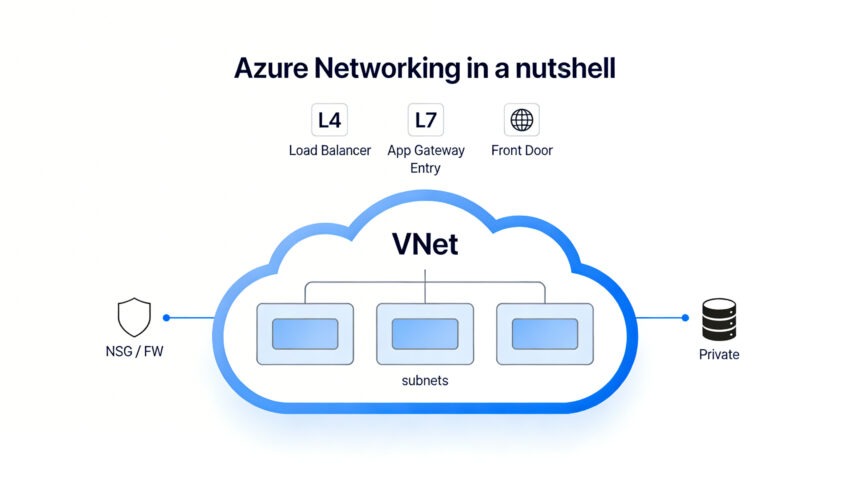
Here is Azure networking in a nutshell.
1. Virtual Networks (VNets) and Subnets
What Is a VNet?
A Virtual Network (VNet) is a logically isolated Layer 3 network in Azure.
You define an address space using CIDR, for example:
- 10.0.0.0/16
- 172.16.0.0/16
Azure Virtual Network overview.
Unlike on-prem:
- No VLANs
- No Layer 2
- No broadcast domains
- No manual router configuration
Everything operates at Layer 3.
Subnets and the 5 Reserved IP Addresses
Subnets divide a VNet into smaller address ranges. Example:
- 10.0.1.0/24 – Frontend
- 10.0.2.0/24 – Backend
- 10.0.3.0/24 – Data
Here is what some may forget and what can affect your planning:
Azure reserves 5 IP addresses in every subnet. (Official FAQ)
For a /24 subnet: 256 total IPs – 5 reserved = 251 usable IPs
If you create a /29: 8 total IPs – 5 reserved = 3 usable IPs
That can break deployments.
Reserved IPs include:
- Network address
- Default gateway
- Two Azure DNS IPs
- Broadcast address
Why This Matters
Services consume IPs quickly:
- Private Endpoints
- AKS nodes
- Application Gateway
- Azure Firewall
When planning the subnet, include some overhead. Just for unexpected (uncalculated) occurrences. Expanding them later is challenging and may require downtime. Note that for some services, there is a minimum size of a subnet.
2. Routing
Azure automatically creates system routes in every subnet. But you have an option to create a user-defined route (UDR) to override the routing.
By default:
- VNet traffic is routed internally.
- Internet traffic is allowed, unless you restrict it*
- Peer traffic is routed.
- VPN/ExpressRoute routes propagate automatically.
How to Override Routing
You override routing using:
- User-Defined Routes (UDRs)
- Azure Firewall
- NAT Gateway
- Virtual appliances
If you attach a Route Table to a subnet, you can force: 0.0.0.0/0 → Azure Firewall. Now all outbound traffic goes through inspection. This is a difference from on-prem, where internet access must be explicitly configured.
*In Azure, outbound internet is open unless you restrict it. There is a default route: 0.0.0.0/0 → Internet. This means outbound internet access works even if you do nothing. Note that there is a planned change to this default route (Default Outbound Access Retirement).
3. Network Security Groups vs Azure Firewall
Network Security Groups (NSGs)
NSGs are Layer 4 firewalls. They apply at the subnet or NIC level. They use stateful rules evaluated by priority (lowest number first). Once matched, processing stops, with an implicit final deny for unmatched traffic.
Use NSGs for:
- East-west segmentation
- Basic filtering
They are simple rules and low cost. But they can be challenging to centrally manage.
Azure Firewall
Azure Firewall is a managed Layer 3–7 firewall.
It supports:
- Central logging
- FQDN filtering
- Threat intelligence
- IDPS
It requires a dedicated subnet.
Comparison
| Feature | NSG | Azure Firewall |
| Layer | L4 | L3–L7 |
| Central Control | No | Yes |
| FQDN Filtering | No | Yes |
| Cost | Free* | Higher |
| Dedicated Subnet | No | Yes |
Use NSGs for micro-control. Use a firewall for centralized enterprise control.
*Indirect costs may arise from related features like NSG Flow Logs (NSG Flow Logs will retire on September 30, 2027), VNet Flow Logs, or Network Watcher diagnostics.
VNet Flow Logs vs NSG Flow Logs
Azure VNet Flow Logs and NSG Flow Logs are both Network Watcher features for capturing IP traffic data. VNet Flow Logs (GA in 2024) offers a broader scope and replaces NSG Flow Logs long-term.
| Aspect | NSG Flow Logs | VNet Flow Logs |
| Scope | Traffic through specific NSGs (subnet/NIC) | Virtual Network level (VNet, subnet, NIC) |
| Requirements | NSG must be attached; multi-level config | No NSG required; single enablement |
| Traffic Analysis | NSG rules only | NSG + Virtual Network Manager security rules |
| Encryption Status | Not captured | Captured (e.g., for VNet encryption) |
| Log Format | JSON, Layer 4 flows, 1-min intervals | JSON, Layer 4 flows + throughput, 1-min intervals |
| Retirement | Retires Sept 30, 2027; no new after Jun 2025 | Recommended replacement; disable NSG duplicates |
4. Public IPs, Private IPs, and NAT
Azure Public IPs, Private IPs, and NAT Gateway manage addressing and outbound internet access for VNet resources like VMs, AKS clusters, App Services, and Container Instances.
Private IPs enable internal subnet communication across VNet resources. Public IPs allow inbound internet exposure. NAT Gateway prevents SNAT port exhaustion for multi-instance workloads sharing outbound connectivity. It offers stable egress IPs, 64K+ ports per IP, and high reliability.
| Feature | Private IP | Public IP | NAT Gateway |
| Scope | Internal VNet | Internet-facing | Outbound internet |
| Use Case | Resource networking | Inbound access | Shared egress (VMs/AKS/App Service) |
| Port Limits | N/A | ~1K concurrent (default) | 64K+ per IP, scalable |
SNAT and NAT Gateway
When many VMs share outbound internet, they consume SNAT ports. Under load, this can cause connection failures.
NAT Gateway:
- Provides a stable outbound IP
- Increases SNAT capacity
- Improves reliability
This is often ignored until production traffic grows.
5. DNS and Private DNS
DNS is critical in Azure. Azure DNS and Private DNS Zones manage name resolution in Azure networks. Public zones for internet-facing services and private zones for internal/VNet-specific resolution.
Key Features
Azure DNS hosts public domains with global anycast for high availability. Private DNS Zones enable custom DNS within VNets. They are mandatory for Private Endpoints to map private IPs correctly. Without proper linking, connectivity fails despite network setup.
Azure provides:
- Public (Azure DNS): Standard DNS hosting, traffic routing.
- Private (Private DNS Zones): VNet integration, overrides public records for isolation.
6. Service Endpoints vs Private Endpoints vs Private Link
This is one of the most misunderstood areas.
Azure Service Endpoints, Private Endpoints, and Private Link enhance secure connectivity from VNets to Azure PaaS services like Storage or SQL.
Service Endpoints extend VNet identity to PaaS services over Azure’s backbone while keeping public endpoints active. Private Endpoints (powered by Private Link) map specific service instances to private IPs in your VNet for full isolation. Private Link is the underlying service. It enables Private Endpoints across Azure and Marketplace offerings.
- Extend VNet identity to PaaS
- Traffic still hits the public endpoint
- No extra cost
- Creates a private IP inside the VNet
- No public exposure
- Requires Private DNS
Comparison
| Feature | Service Endpoint | Private Endpoint |
| Uses Private IP | No | Yes |
| Public Endpoint Exists | Yes | No |
| DNS Changes Required | No | Yes (Private DNS zone) |
| Security Level | Medium | High |
| Cost | Free | Charged |
| Traffic Path | Azure backbone to public IP | Private IP in your VNet |
| Scope | Per service (broad access) | Per instance (granular) |
| Best For | Simple VNet-to-PaaS security | Compliance, hybrid/on-premises access |
Private Link is the underlying platform that enables Private Endpoints. Use Service Endpoints for simple protection. Use Private Endpoints for strict isolation.
7. VNet Peering and Virtual WAN
VNet Peering
VNet Peering connects two VNets for direct, low-latency communication within or across Azure regions.
- Not transitive by default.
- No overlapping CIDR allowed.
- Traffic is billed.
If A peers with B and B peers with C, A does not automatically reach C.
Virtual WAN
Virtual WAN simplifies large-scale, global networking via centralized hubs. Use it when:
- Many branches exist.
- Global routing is needed.
- You want a simplified transit design.
Comparison
| Feature | VNet Peering | Virtual WAN |
| Connectivity | Direct VNet-to-VNet | Global hub-and-spoke |
| Transitivity | No (default) | Yes |
| CIDR Overlap | Not allowed | Supported via hubs |
| Best For | Simple 2-VNet links | Enterprise/global/branch networks |
| Traffic Cost | Billed per GB | Billed (hubs + data transfer) |
8. Application Gateway vs Load Balancer vs Front Door
Azure Load Balancer, Application Gateway, and Front Door handle traffic distribution at different layers and scopes per Microsoft’s load balancing decision guide.
| Service | Layer | Scope | Use Case | Key Notes |
| Load Balancer | L4 | Regional | TCP/UDP workloads (VMs, AKS nodes) | Basic, high-performance |
| Application Gateway | L7 | Regional | Web apps + WAF | Dedicated subnet required |
| Front Door | L7 | Global | Global web + CDN | Private Link integration |
Choose based on protocol needs (L4 vs. L7), regional vs. global reach, and extras like WAF or CDN.
9. Other worth knowing networking rules
- Some services need dedicated subnets. If you deploy them into shared subnets, deployment fails.
- Azure Firewall
- Application Gateway
- Bastion
- VPN Gateway
- ExpressRoute Gateway
- Subnet delegation limits usage. When you delegate a subnet to a service like App Service Environment or Application Gateway, you cannot deploy VMs into it.
- Private Endpoints consume IPs.
- No overlapping CIDR across peered VNets.
- No Layer 2 in Azure.
Recommended Learning and Reading
John Savill – Azure Networking Master Class.
Final Thoughts
Azure networking looks simple at first. Routing works automatically. VNets are easy to create.
But under the surface lie details which add to the complexity:
- 5 IPs are always reserved.
- No Layer 2 exists.
- Peering is not transitive.
- Subnet sizing is critical.
- DNS is mandatory for private connectivity.
Networking is the core of Azure architecture. If you understand it, designing and working with Azure will be much easier.
